Introduction
DIY Layout Creator (DIYLC) is a specialized software tool designed for hobbyists and electronics enthusiasts to create circuit layouts on stripboard, perfboard, PCB, and point-to-point wiring. It provides an intuitive, drag-and-drop interface for placing components, arranging connections, and visualizing circuit designs before assembly. With a built-in component library and customization options, it allows users to design layouts with precision and clarity. The software is particularly useful for designing, analyzing, and debugging guitar wiring diagrams, helping musicians and builders plan and troubleshoot custom wiring configurations for pickups, switches, and controls. Its versatility makes it an ideal solution for DIY electronics projects, prototyping, and documentation.
Click here to get the latest version for all platforms.
Click here to read the user documentation as well as developer documentation.
Mac users: in most instances, the Gatekeeper will block DIYLC and mark it as damaged because it's a 3rd party app from an independent vendor (me). This document covers how to allow DIYLC on your Mac.
Samples
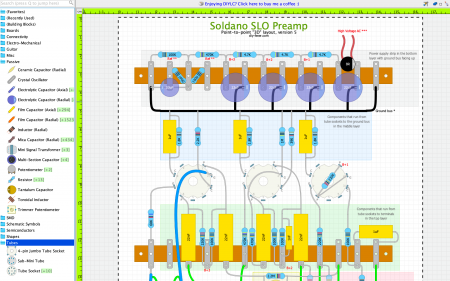
Point-to-point tube amplifier
Guitar wiring

PCB tube amplifier

Perfboard guitar effect

Features
- platform independence, will run on any machine having Java JRE/JDK 8 or newer
- easy to use interface, most of the operations can be done using mouse
- draw PCB, perfboard, stripboard or point-to-point circuit layouts layouts, schematics and guitar wiring diagrams
- high flexibility, has the API to allow plug-ins and new components to be added
- improved performance and reduced memory consumption compared to the previous versions
- save default values for each property of a component individually
- group components together and treat them as one, e.g. move, edit or delete
- export the output to image, PDF or printer
- export PCB trace mask suitable for toner transfer
- export PCB designs to Gerber for fabrication
- create a Bill of Materials as a part of the project or export it to few different file formats
- analyze guitar wirings and show detailed pickup configuration in each switch configuration
- zoom in/out feature
- configurable grid spacing on the project level
- auto update checks for new versions
- import files created with older versions of the application
- cloud feature - share your projects, search through the cloud and download other users' projects
- highlight connected areas to simplify validation and circuit debugging
- analyze guitar wiring diagrams and visualize pickup wirings for each switch configuration
- export circuits to SPICE-compatible netlists
To report bugs or request a new feature go to Issues page and create a new issue describing your problem or request.
To join the discussion or request technical assistance, use the dedicated Discussion Group.
Want to contribute?
DIYLC is provided free of charge and can be used and redistributed freely. Please note that it takes a lot of time and effort to build, test and maintain it and to interact with the growing community of users. If you find DIYLC useful and want to support further development, these are some of the ways you can contribute
License information
Source code is released under GNU General Public License version 3. Contact the project owner to obtain a license in case you plan to use the source code, or any part of it, in commercial purposes.
Credits
- Big thanks goes to folks from the following online communities for contributing ideas and helped test the app: DIY Stompboxes, AX84 and Free Stompboxes.
- I'm happy to report that DIYLC 4 is the fastest version ever. YourKit Java Profiler helped tremendously with memory and performance profiling and pointed me to places in the code that took longer to run or consumed more memory than I'd like them to. I strongly recommend this tool to anyone developing Java or .NET applications because it helps finding bottlenecks and allocation hot-spots very fast.
YourKit is kindly supporting open source projects with its full-featured Java Profiler.
YourKit, LLC is the creator of innovative and intelligent tools for profiling Java and .NET applications.
Take a look at YourKit's leading software products: YourKit Java Profiler and YourKit .NET Profiler


